Apex 3 Specs, Features, and Value: Is it worth the price tag?
In the rapidly evolving landscape of gaming peripherals, the entry-level market has become one of the most fiercely contested segments. Manufacturers are no longer content with providing basic, membrane-based peripherals; instead, they are striving to pack high-end features, premium aesthetics, and robust durability into packages that remain accessible to the average consumer. The SteelSeries Apex 3 stands at the forefront of this movement. As a keyboard that bridges the gap between budget-friendly office hardware and high-performance gaming gear, it promises a silent, water-resistant, and aesthetically pleasing experience without the hefty price tag associated with mechanical switches. This article provides an exhaustive analysis of the Apex 3, examining its technical specifications, real-world performance, and overall market value to determine if it truly justifies its place on your desktop.
The Design Philosophy: Durability Meets Aesthetics
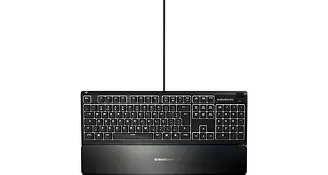
The first thing one notices about the Apex 3 is that it does not look like a budget keyboard. SteelSeries has maintained the design language of its more expensive Apex Pro and Apex 7 models, utilizing a sleek, low-profile chassis that feels intentional and modern. While the frame is constructed from a high-quality polymer rather than the aircraft-grade aluminum found in the premium siblings, it remains exceptionally sturdy. There is very little flex in the board, even under heavy typing pressure, which is a common pitfall for keyboards in this price bracket.
One of the standout physical features is the inclusion of a premium magnetic wrist rest. In the sub-hundred-dollar category, wrist rests are often either non-existent or made of hard, uncomfortable plastic that clips on via fragile tabs. SteelSeries opts for a soft-touch finish and a magnetic attachment system that makes it incredibly easy to snap on or off. For users who spend eight hours a day coding or writing followed by several hours of gaming, this ergonomic addition is a significant factor in reducing wrist strain and improving long-term comfort.
Technical Specifications Breakdown
To understand the performance profile of the Apex 3, we must look at the hardware driving the experience. Unlike mechanical keyboards that use individual physical switches for every key, the Apex 3 utilizes a high-quality membrane layer designed for specific tactile feedback. Below is a detailed look at the core specifications.
| Feature | Specification Details |
|---|---|
| Switch Type | SteelSeries Whisper-Quiet Gaming Switches |
| Switch Durability | Rated for 20 Million Keypresses |
| Illumination | 10-Zone RGB Customization |
| Water Resistance | IP32 Rated |
| N-Key Roll Over | 24-Key Anti-Ghosting |
| Media Controls | Dedicated Volume Roller and Media Key |
| Weight | Approx. 1.8 lbs (816 grams) |
| Connectivity | Wired USB (High-quality rubber cable) |
Feature Analysis: Whisper-Quiet Switches and IP32 Protection
The "Whisper-Quiet" switches are arguably the defining feature of the Apex 3. In the gaming world, loud "clicky" switches are often marketed as the gold standard, but for many users, this is a drawback. A gamer living in a shared apartment, a student in a dorm, or a professional who uses their gaming rig for Zoom calls often needs a silent keyboard. These switches are designed with low-friction components that drastically reduce the noise of the key reset and impact. The result is a keystroke that is significantly quieter than almost any mechanical switch on the market, while still providing a tactile "bump" that tells your fingers the key has been registered.
Another major selling point is the IP32 water resistance. Accidental spills are the leading cause of keyboard failure. Whether it is a morning coffee or a late-night energy drink, most keyboards are one liquid mishap away from the trash can. The Apex 3 is engineered with internal drainage holes and a protective membrane layer that directs liquid away from sensitive electronics. While it isn't designed to be submerged in a pool, it can easily survive a standard spill, giving peace of mind to clumsy users or those with young children and pets around the workstation.
The 10-Zone RGB Ecosystem
RGB lighting has become a standard requirement for gaming peripherals, but the execution varies wildly. SteelSeries uses a 10-zone system on the Apex 3. This means that while you cannot program the color of every individual key, you can customize ten distinct vertical sections of the keyboard. Through the SteelSeries Engine software, users can set reactive effects, color shifts, or static themes. The lighting is vibrant and diffuses well through the semi-translucent base layer of the switches, creating a "glow" effect that looks particularly impressive in low-light environments. Furthermore, the software allows for integration with certain games and apps, like Reacting to Discord notifications or in-game health status.
Real-World Use Cases: Typing vs. Gaming
When evaluating a keyboard, it is vital to distinguish between the typing experience and the gaming experience. For writers and office professionals, the Apex 3 provides a very comfortable, albeit slightly "mushy" feel compared to mechanical alternatives. Membrane keyboards require a bit more force to bottom out, but the Whisper-Quiet switches mitigate the fatigue often associated with cheap membrane boards. The magnetic wrist rest is a champion here, supporting the palms during long stretches of data entry or drafting.
Shop the latest Electronics picks on Amazon.
View Offers →For gamers, the 24-key anti-ghosting ensures that even during intense sessions of League of Legends or Counter-Strike, where multiple keys are pressed simultaneously, every command is registered accurately. However, competitive players who rely on "rapid-fire" inputs might notice that membrane switches have a slightly slower return-to-neutral time than high-end mechanical switches. This is a subtle difference that casual and hobbyist gamers likely won't mind, but it is worth noting for those playing at a professional or semi-professional level.
Dedicated Media Controls
Many budget keyboards hide media controls behind "Function" (Fn) key combinations, which can be awkward to use in the middle of a game. The Apex 3 features a dedicated clickable metal roller and a media button in the upper right-hand corner. The roller feels premium and allows for granular volume adjustment, while the button can play, pause, and skip tracks with various click patterns. It is a small convenience, but one that significantly enhances the daily quality of life for users who listen to music or watch videos while they work or play.
Pros and Cons
Every product involves trade-offs, particularly at an entry-level price point. Here is a summary of the strengths and weaknesses of the Apex 3.
- Pros:
- Extremely quiet operation, perfect for shared environments and late-night sessions.
- IP32 water resistance offers highly valuable protection against common spills.
- Premium magnetic wrist rest included, providing excellent ergonomics.
- Sturdy build quality with a weight that prevents sliding on the desk.
- User-friendly software (SteelSeries Engine) for easy customization of RGB and macros.
- Dedicated media controls simplify volume and playback management.
- Cons:
- Membrane switches lack the crisp, tactile precision of mechanical switches.
- 10-zone RGB means no per-key lighting customization.
- Non-detachable rubber cable feels a bit basic compared to braided options.
- Large footprint due to the full-size layout and wrist rest might challenge small desks.
Buying Guide: Is the Apex 3 Right for You?
Choosing a keyboard involves more than just looking at the price; it is about matching the features to your specific lifestyle. To help you decide, consider the following personas and how the Apex 3 fits their needs.
The "Quiet Room" Gamer
If you live with a partner who goes to bed early, or you frequently stream on platforms like Twitch and don’t want your microphone picking up loud "clacking" sounds, the Apex 3 is arguably one of the best options available. It provides the gaming aesthetic and features (macros, RGB) without the acoustic intrusion.
The Practical Student
For a student who needs a keyboard that can handle a 3,000-word essay and then transition into a few hours of gaming, the Apex 3 is a versatile tool. The water resistance is particularly useful in a dorm environment where space is tight and drinks are often placed perilously close to electronics.
The Budget-Conscious Beginner
If you are building your first gaming PC and want to save money for a better GPU or CPU, the Apex 3 allows you to get a high-quality name-brand peripheral for a fraction of the cost of "pro" models. You get the SteelSeries ecosystem and durability without spending triple digits.
Find top-rated Electronics products at great prices.
See Deals →Who should skip it?
If you are a "keyboard enthusiast" who loves the feeling of mechanical switches (like Cherry MX Blues or Browns), you will likely find the membrane feel of the Apex 3 unsatisfying. Similarly, if you require a compact keyboard for travel or have a very small desk, you might prefer a "Tenkeyless" (TKL) or 60% layout instead of this full-sized model.
Comparison with Competitors
In the entry-level gaming space, the Apex 3 often goes head-to-head with the Razer Cynosa V2 and the Corsair K55. While all three are membrane-based, the Apex 3 distinguishes itself with its superior physical build and the inclusion of the magnetic wrist rest, which Razer and Corsair sometimes omit or implement with lower-quality plastic. While Razer offers per-key RGB, which is technically superior to the 10-zone system, the SteelSeries software is often cited as being more lightweight and less intrusive on system resources.
Maintenance and Longevity
One aspect buyers often overlook is the ease of cleaning. Because the Apex 3 is water-resistant, it is much easier to maintain than a standard board. The keycaps can be easily removed for a deep clean, and the drainage system means you don't have to panic if a bit of moisture gets under the keys during cleaning. With a durability rating of 20 million keystrokes, the board is designed to last several years of daily use, which is a significant improvement over generic office keyboards that often fail after a year of heavy gaming.
Cable Management
SteelSeries has included three-way cable routing on the underside of the Apex 3. This allows you to exit the USB cable from the left, right, or center of the keyboard. In a world where desk aesthetics are increasingly important, this small design choice helps keep the desk clean and prevents the cable from getting tangled with other peripherals like your mouse or headset.
Conclusion
The SteelSeries Apex 3 is a masterclass in prioritized engineering. It recognizes that not every gamer needs, or even wants, a loud mechanical keyboard. By focusing on the features that provide the most tangible daily benefits—such as near-silent operation, liquid protection, and superior ergonomics—SteelSeries has created a product that feels more "premium" than its price suggest. While it may lack the per-key customization and the sharp tactile feedback of mechanical switches, it compensates with a level of reliability and comfort that is hard to find in this category.
Ultimately, if you are looking for a solid, reliable, and beautiful keyboard that won't wake up the neighbors and can survive a spilled soda, the Apex 3 is well worth the investment. It provides an excellent entry point into the gaming world while serving as a perfectly competent tool for professional work. For most users, the "mushy" feel of membrane is a small price to pay for the quiet and peace of mind this keyboard provides.